Beta Feature: Audio passthrough mode is currently in beta. APIs may change as we continue to improve the integration.
Want to use ElevenLabs Agents with Anam? We recommend the server-side ElevenLabs integration instead—it’s simpler and has lower latency. This page covers the client-side approach for when you need direct control over the audio pipeline.
This guide shows how to use Anam’s audio passthrough mode to pipe externally-generated speech audio into an avatar for real-time lip-sync. The example below uses ElevenLabs Conversational AI as the TTS source, but the same pattern works with any TTS provider (Cartesia, PlayHT, Azure Speech, Google Cloud TTS, etc.)—you just need to deliver PCM audio chunks to the Anam SDK.
Your TTS must generate audio above realtime speed. If your TTS provider streams audio slower than 1x realtime, you will experience stutter and frame drops because Anam needs extra time to buffer and render the lip-sync animation. Most cloud TTS providers stream well above realtime, but verify this before going to production.

View Example

Full source code for the ElevenLabs conversational agent with Anam avatar (client-side).

How It Works

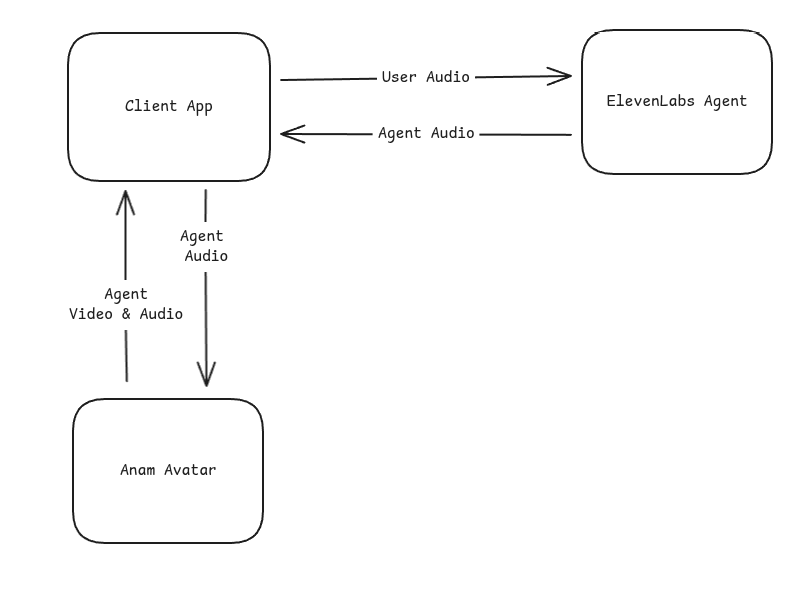
The integration uses Anam’s audio passthrough mode, where Anam renders an avatar that lip-syncs to audio you provide—without using Anam’s own AI or microphone input.
Bring Your Own Voice: Your TTS provider generates the speech audio. Anam renders the lip-synced avatar video.

Quick Start

Prerequisites

  • An account with your TTS provider (ElevenLabs used in this example)
  • Anam account with API access
  • Node.js or Bun runtime
  • Modern browser with WebRTC support (Chrome, Firefox, Safari, Edge)

Installation

npm install @anam-ai/js-sdk chatdio
chatdio provides microphone capture utilities used to send user audio to ElevenLabs.

Basic Integration

Here’s the core pattern for connecting an external TTS source to Anam:
import { createClient } from "@anam-ai/js-sdk";

// 1. Create Anam client with audio passthrough session
const anamClient = createClient(sessionToken, {
  disableInputAudio: true, // Your TTS provider handles microphone
});
await anamClient.streamToVideoElement("video-element");

// 2. Create agent audio input stream
const audioInputStream = anamClient.createAgentAudioInputStream({
  encoding: "pcm_s16le",
  sampleRate: 16000,
  channels: 1,
});

// 3. Connect to your TTS provider and forward audio
// (ElevenLabs WebSocket shown here as an example)
const ws = new WebSocket(`wss://api.elevenlabs.io/v1/convai/conversation?agent_id=${agentId}`);

ws.onmessage = (event) => {
  const msg = JSON.parse(event.data);

  if (msg.type === "audio" && msg.audio_event?.audio_base_64) {
    // Forward audio chunks to Anam for lip-sync
    audioInputStream.sendAudioChunk(msg.audio_event.audio_base_64);
  }

  if (msg.type === "agent_response") {
    // Signal end of audio sequence
    audioInputStream.endSequence();
  }

  if (msg.type === "interruption") {
    // Handle barge-in: stop the avatar animation and end the audio sequence
    anamClient.interruptPersona();
    audioInputStream.endSequence();
  }
};

Full Example

Project Structure

src/
├── client.ts          # Main client orchestration
├── elevenlabs.ts      # ElevenLabs WebSocket handling
└── routes/
    └── api/
        └── config.ts  # Server-side session token endpoint

Server: Create Anam Session

Your server creates an Anam session token with enableAudioPassthrough: true:
config.ts
const response = await fetch("https://api.anam.ai/v1/auth/session-token", {
  method: "POST",
  headers: {
    "Content-Type": "application/json",
    Authorization: `Bearer ${ANAM_API_KEY}`,
  },
  body: JSON.stringify({
    personaConfig: {
      avatarId: AVATAR_ID,
      enableAudioPassthrough: true, // Enable external audio input
    },
  }),
});

const { sessionToken } = await response.json();

Client: ElevenLabs Module

Handle the WebSocket connection and microphone capture:
elevenlabs.ts
import { MicrophoneCapture, arrayBufferToBase64 } from "chatdio";

const SAMPLE_RATE = 16000;

export interface ElevenLabsCallbacks {
  onReady?: () => void;
  onAudio?: (base64Audio: string) => void;
  onUserTranscript?: (text: string) => void;
  onAgentResponse?: (text: string) => void;
  onInterrupt?: () => void;
  onError?: () => void;
  onDisconnect?: () => void;
}

export async function connectElevenLabs(agentId: string, callbacks: ElevenLabsCallbacks) {
  const ws = new WebSocket(`wss://api.elevenlabs.io/v1/convai/conversation?agent_id=${agentId}`);

  // Set up microphone capture
  const mic = new MicrophoneCapture({
    sampleRate: SAMPLE_RATE,
    echoCancellation: true,
    noiseSuppression: true,
  });

  mic.on("data", (data: ArrayBuffer) => {
    if (ws.readyState === WebSocket.OPEN) {
      ws.send(
        JSON.stringify({
          user_audio_chunk: arrayBufferToBase64(data),
        })
      );
    }
  });

  ws.onopen = async () => {
    await mic.start();
    callbacks.onReady?.();
  };

  ws.onmessage = (event) => {
    const msg = JSON.parse(event.data);

    switch (msg.type) {
      case "audio":
        callbacks.onAudio?.(msg.audio_event.audio_base_64);
        break;
      case "agent_response":
        callbacks.onAgentResponse?.(msg.agent_response_event.agent_response);
        break;
      case "user_transcript":
        callbacks.onUserTranscript?.(msg.user_transcription_event.user_transcript);
        break;
      case "interruption":
        callbacks.onInterrupt?.();
        break;
      case "ping":
        ws.send(JSON.stringify({ type: "pong", event_id: msg.ping_event.event_id }));
        break;
    }
  };

  ws.onclose = () => {
    mic.stop();
    callbacks.onDisconnect?.();
  };
}

Client: Main Integration

Wire everything together:
client.ts
import { createClient } from "@anam-ai/js-sdk";
import { connectElevenLabs } from "./elevenlabs";

async function startConversation() {
  // Get session config from your server
  const { anamSessionToken, elevenLabsAgentId } = await fetch("/api/config").then((r) => r.json());

  // Initialize Anam avatar (disable input audio since ElevenLabs handles mic)
  const anamClient = createClient(anamSessionToken, {
    disableInputAudio: true,
  });
  await anamClient.streamToVideoElement("anam-video");

  // Create agent audio input stream
  const audioInputStream = anamClient.createAgentAudioInputStream({
    encoding: "pcm_s16le",
    sampleRate: 16000,
    channels: 1,
  });

  // Connect to ElevenLabs
  await connectElevenLabs(elevenLabsAgentId, {
    onAudio: (audio) => {
      audioInputStream.sendAudioChunk(audio);
    },
    onAgentResponse: () => {
      audioInputStream.endSequence();
    },
    onInterrupt: () => {
      anamClient.interruptPersona();
      audioInputStream.endSequence();
    },
  });
}

Cleanup

Stop the conversation and release resources:
function stopConversation() {
  anamClient.stopStreaming();
}

Configuration

Environment Variables

1

Get your API credentials

You’ll need credentials from both services:
ServiceWhere to get it
Anamlab.anam.ai → Settings → API Keys
ElevenLabselevenlabs.io → Agents
2

Set environment variables

.env
# Anam credentials
ANAM_API_KEY=your_anam_api_key
ANAM_AVATAR_ID=your_avatar_id

# ElevenLabs credentials
ELEVENLABS_AGENT_ID=your_agent_id

ElevenLabs Agent Setup

When configuring your ElevenLabs agent, set the output audio format to match Anam’s expectations:
SettingValue
FormatPCM 16-bit
Sample Rate16000 Hz
ChannelsMono
Mismatched audio formats will cause lip-sync issues. Ensure your TTS provider outputs PCM16 at 16kHz.

Choosing an Avatar

Audio Passthrough API

createAgentAudioInputStream()

Creates a stream for sending audio chunks to the avatar for lip-sync. Must be called after streamToVideoElement() resolves (the session must be started first).
const audioInputStream = anamClient.createAgentAudioInputStream({
  encoding: "pcm_s16le",
  sampleRate: 16000,
  channels: 1,
});
encoding
string
required
Audio encoding format. Only pcm_s16le (16-bit signed little-endian PCM) is supported.
sampleRate
number
required
Sample rate in Hz. Should match your TTS provider output (typically 16000).
channels
number
required
Number of audio channels. Use 1 for mono.

sendAudioChunk()

Send a base64-encoded audio chunk for lip-sync rendering.
audioInputStream.sendAudioChunk(base64AudioData);
Audio chunks can be sent faster than realtime. Anam buffers them internally and renders lip-sync at the correct pace.

endSequence()

Signal that the current audio sequence has ended. This helps Anam optimize lip-sync timing and handle transitions.
audioInputStream.endSequence();
Call this when:
  • Your TTS provider signals the agent has finished speaking
  • The user interrupts (barge-in)

Handling Interruptions

When a user speaks while the agent is talking (barge-in), your TTS provider sends an interruption event. Handle it by interrupting the avatar and ending the audio sequence:
onInterrupt: () => {
  anamClient.interruptPersona();
  audioInputStream.endSequence();
},
interruptPersona() stops the avatar’s current lip-sync animation immediately. endSequence() tells the audio stream that the current sequence is done. Both are needed—without interruptPersona(), the avatar may continue playing buffered audio.

Performance Considerations

Latency

This integration combines two real-time services, which adds latency compared to using Anam’s turnkey solution:
PathTypical Latency
User speech → ElevenLabs STT200-400ms
ElevenLabs LLM processing300-800ms
ElevenLabs TTS → Anam avatar100-200ms
Total end-to-end600-1400ms
For lower latency requirements, consider using Anam’s turnkey solution which handles STT, LLM, and TTS in an optimized pipeline, or the server-side ElevenLabs integration which reduces latency through server-to-server audio flow.

Browser Compatibility

The integration requires WebRTC support. Tested browsers:
BrowserSupport
Chrome 80+Full support
Firefox 75+Full support
Safari 14+Full support
Edge 80+Full support
Mobile browsers are supported but may have higher latency on cellular networks.

Billing

When using audio passthrough mode:
  • Anam: Billed for avatar streaming time (session duration)
  • TTS Provider: Billed separately for STT, LLM, and TTS usage
Check both Anam pricing and your TTS provider’s pricing to understand total costs.

When to Use This Approach

This client-side approach is a good fit when you:
  • Need direct control over the audio pipeline in the browser
  • Want to use client-side tools with your TTS provider’s agent
  • Have an existing client-side integration you want to add avatars to
For most new projects, we recommend the server-side integration instead—it’s simpler to set up and has lower latency.

Troubleshooting

  • Verify audio format matches (PCM16, 16kHz, mono)
  • Check that sendAudioChunk() is receiving data
  • Ensure the audio input stream was created successfully
  • Look for errors in browser console
  • Call endSequence() when agent responses complete
  • Ensure you’re handling interruptions correctly
  • Check network latency to both services
  • Verify your TTS provider agent is configured correctly
  • Check the WebSocket connection is established
  • Look for audio events in the message handler
  • Confirm your agent ID is correct
  • Check browser permissions for microphone access
  • Ensure echoCancellation is enabled to prevent feedback
  • Verify the microphone is sending data at 16kHz
  • Verify your ANAM_API_KEY is valid
  • Check that enableAudioPassthrough: true is set in the session request
  • Ensure the avatar ID exists in your account

Resources